Help
    Help Centre

    Getting started

    • What is Florin House?

    Coins and values

    • Finding a coin in the catalogue
    • Rarity scores and coin values

    Your collection

    • Tracking your collection
    • Import your Numista or CoinSnap collection
    • The daily coin games

    Communities

    • Communities and coin hubs

    Buying

    • Buying a coin safely
    • Delivery and tracking
    • Returns, refunds and disputes

    Selling

    • Selling a coin
    • Fees explained
    1. Home
    2. ›Help Centre
    3. ›Tracking your collection

    Your collection

    Tracking your collection

    Add the coins you own, see what they are worth together, and keep a want list of the ones you are still hunting.

    Published 22 September 2026 · Last updated 23 September 2026

    Adding a coin you own#

    Find the coin in the catalogue and add it from the coin card or its page.

    Already record your coins on Numista or CoinSnap? Import the whole collection from a CSV export instead of adding them one at a time.

    1. 1Find the coin — Browse Coins or Discover.
    2. 2Use the + button on the coin card, or open the coin and add it from there.
    3. 3Say what condition your example is in. This is what makes the value estimate meaningful.
    4. 4Save. The coin now counts towards your collection total.
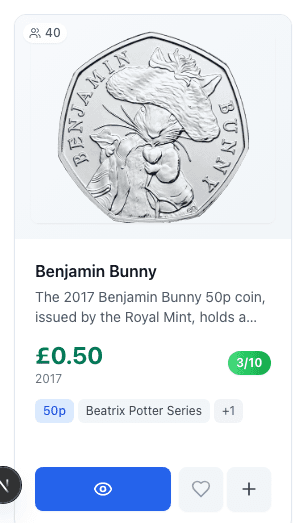
    A single coin card with its view, want and add-to-collection buttons
    The three buttons on every coin card: view the coin, ♡ add it to your want list, + add it to your collection.

    Record condition honestly. The collection total is only as good as the conditions you enter, and it is the number you will reach for when you insure or sell.

    Your want list#

    A want list records coins you are trying to find. It is not just a note to yourself: when someone lists one for sale, you are told.

    Use the heart on a coin card, or the want button on a coin page. It pairs well with a community, which shows you at a glance which coins in a set you are still missing.

    Public or private#

    Public or private, your choice: collections are public unless you switch them off in your profile settings.

    A public collection appears on your profile, where other collectors can see and like it — which is how people find each other here, and how a set earns enough activity to get its own community page.

    To hide yours, switch off Public Collection under Privacy & Display in your profile settings. Show Collection Value, beside it, decides whether the estimated total is shown as well. You can change either at any time.

    Read next

    • Finding a coin in the catalogue
    • Communities and coin hubs
    • Buying a coin safely
    PreviousRarity scores and coin valuesNextImport your Numista or CoinSnap collection

    On this page

    • Adding a coin you own
    • Your want list
    • Public or private

    Explore

    • Browse coins
    • Discover
    • Communities
    • Collectors

    Trade

    • Marketplace
    • For dealers

    Play

    • Games
    • How to play
    • Coindle
    • Coin Detective
    • Higher or Lower

    Learn

    • Coin Stories
    • Guides
    • Help Centre
    • Rare 50p Coins
    • Rare £2 Coins
    • Coin Collecting for Beginners
    • Coin Values Guide
    • Pre-1947 Silver Coins

    Take part

    • Contribute
    Florin
    House

    © 2026 Florin House. All rights reserved.

    Florin House

    support@florinhouse.com

    Help·Privacy Policy·Terms of Service