Your collection
Your insurance catalogue
Photograph the coins you keep, front and back, and download a PDF of them with their details and estimated values to give to your insurer.
Published 11 October 2026
What it is
A private record of the coins you keep at home: each coin photographed front and back, with its details and an estimated value, made into a PDF for your insurer.
Find it under Insurance catalogue in the menu, or go to your catalogue. It lists the coins in your collection.
Starting your catalogue
- 1Open your catalogue and choose Start my catalogue.
- 2Read the four points under Before you start. The full wording is in the terms.
- 3Tick I have read and agree to the insurance catalogue terms, then Agree and start.
One of the points you agree to is that your photos help train Florin House’s coin identifier. You can stop that at any time.
Your photos and training
Florin House uses catalogue photos to build its own coin identifier.
- Photos are never sold, shared or made public.
- Purchase prices and dates, notes, declared values and cover details are never used.
- To stop: Your agreement, at the foot of your catalogue → Stop using my photos for training.
- Changed your mind? Allow it again, in the same place.
Stopping, or deleting a photo, leaves it out of every future training run. A model already trained with it is not retrained.
Photographing your coins
- 1Choose Start photographing (later, Continue photographing).
- 2Fit the coin’s edge to the circle and take the front, then the back.
- 3Move on to the next coin.
- Photograph later — come back to it.
- I don’t have this coin — leave it off the PDF.
- Add a coin that is not listed — it joins your collection too.
To retake or remove a photo, open the coin in your catalogue. A removed photo is deleted, not hidden.
Continuing on your phone
On a computer, starting or continuing shows a QR code. Scan it with your phone to take the photos there.
- 1
Scan the code with your phone’s camera
30 seconds - 2
Tap Continue as you on the phone
2 minutesCheck it shows your own name and @username.
- 3
Photograph on the phone
Your computer shows the photos as they arrive.
The code signs your phone in as you. Don’t share it. If you think someone else used one, choose Sign out other devices on your catalogue page. Rather use the computer? Upload photos from this computer instead.
The free plan: 25 photographed coins
The catalogue is free for 25 photographed coins in total. Your collection itself stays free and unlimited.
- A coin with any photo, even one side, takes a place — and keeps it.
- To free a place, remove that coin’s photos.
- Places not yet taken by photographed coins swap freely: Choose your 25.
- Coins outside the 25 show as Locked on the free plan: still in your collection, not in the PDF or reminders. Swap in where there is room.
- A coin marked I don’t have this coin that still has photos keeps its place.
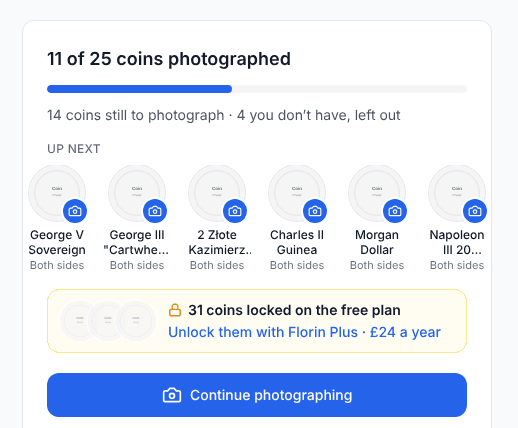
At 25, a new photo is refused with “You’ve photographed 25 coins, the free limit.” Remove another coin’s photos, or keep every coin with Florin Plus.
Florin Plus: every coin
Florin Plus puts every coin you hold in the catalogue: £24 a year, or £2.50 a month.
- Join from any Florin Plus button in the catalogue, without leaving the page.
- Every coin goes into the PDF, the preview and the reminders.
- If you leave with more than 25 coins photographed, you keep 25 of them (you choose which). No new photos until 24 or fewer coins have them.
Downloading the PDF
- 1Fill in Cover details: name, insurer, policy number, notes.
- 2Choose Download PDF, or View PDF to open it in a new tab. On a phone, switch to Preview first.
- 3Send the file to your insurer.
- Made fresh on every download, so it always matches your catalogue.
- A coin without your photo shows No photo yet, never a stock picture.
- Untick Show what I paid for each coin to keep purchase prices off it.
- Values are estimates. A value you enter yourself is printed beside the estimate.
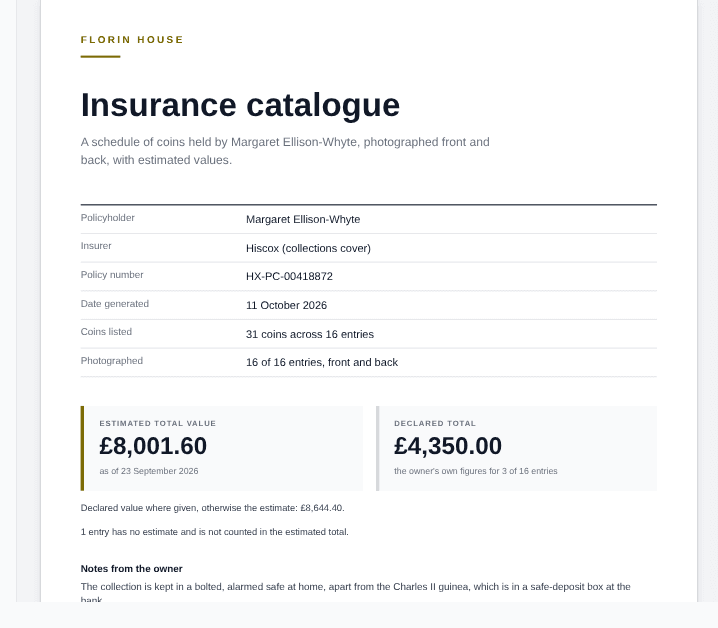
Whether your insurer accepts the PDF, and what to insure for, is between you and them. It is not a professional valuation.
Reminders
Off until you switch on Email me until my catalogue is complete under Reminders.
- Every few days (1–30) or Once a week on a day you pick.
- Morning 9am, Afternoon 1pm or Evening 7pm, UK time.
- Each email lists the next few coins waiting.
- They stop by themselves when the catalogue is complete, and restart if you add a coin.
Photograph the last coin and you get one email saying your catalogue is complete. On the free plan, “complete” means your 25.
Keeping your photos private
- Photos are in private storage: never on your profile or anywhere else on Florin House.
- The location your phone saves in a photo is stripped when it is uploaded.
- Nobody else can see your catalogue or its PDF unless you share a link.
- Florin Plus members can share a read-only link with an insurer, for 7, 30 or 90 days, and revoke it at any time.
- Deleting your account deletes the catalogue and every photo.
The coins themselves are your collection, which is public unless you switch it off. A coin you add while cataloguing joins it. Photos, prices, notes and cover details never do.